
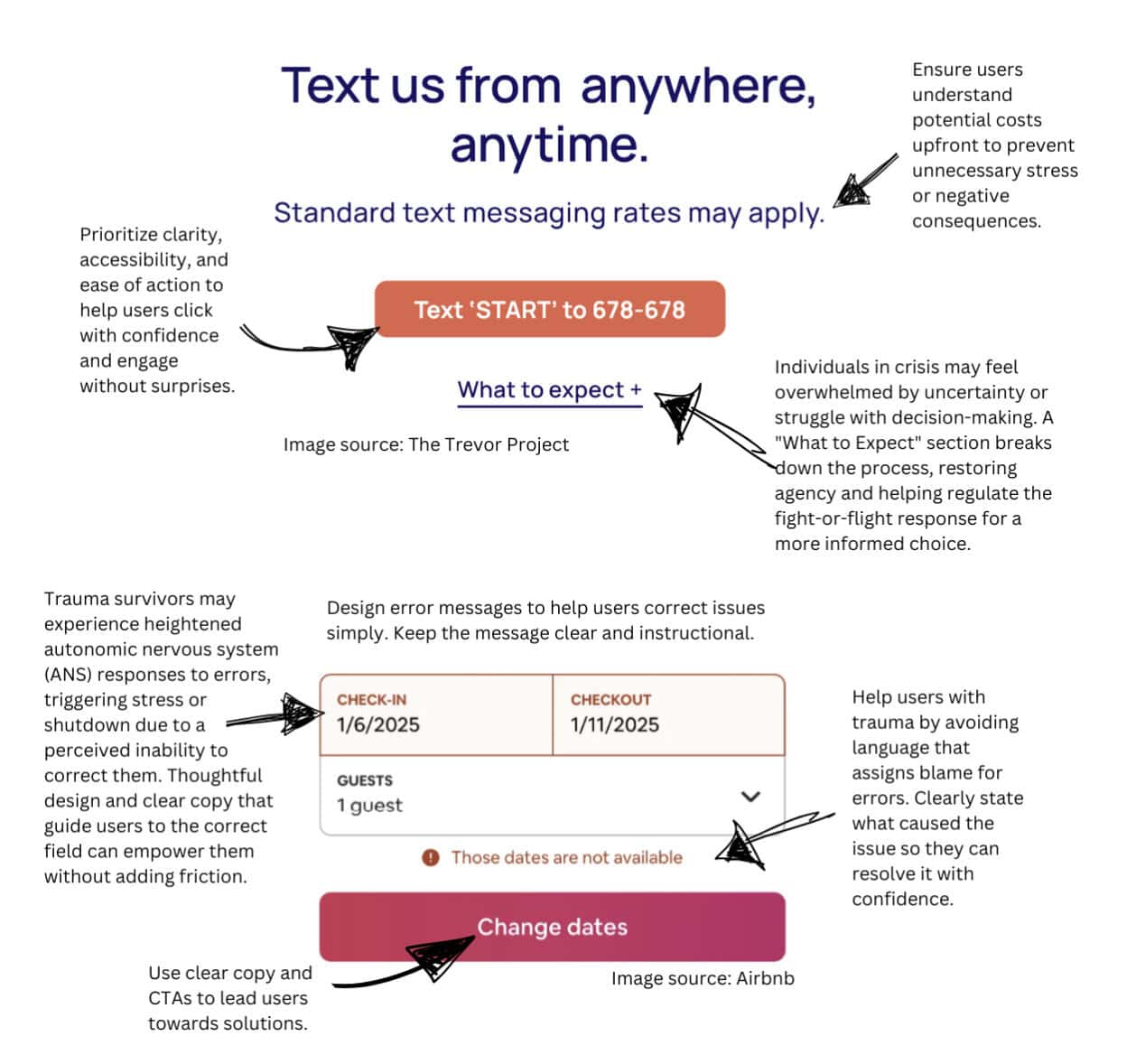
Think about the last time you contacted customer support. Maybe it was a chat bubble popping up, an automated phone tree, or a dense FAQ page. For many of us, it’s a minor frustration. But for neurodiverse individuals—people with autism, ADHD, dyslexia, Tourette’s, and other cognitive variations—these standard support channels can feel like navigating a maze in the dark. The lights are wrong, the signs are confusing, and the pressure to communicate “typically” is exhausting.
Here’s the deal: neurodiversity isn’t a niche concern. It’s a fundamental aspect of human variation. When we design support experiences only for the so-called “average” brain, we exclude a huge portion of our users. And honestly, we miss out on their incredible insights and loyalty. Inclusive support isn’t about building a separate, special lane. It’s about widening the highway so everyone can travel comfortably.
What Neurodiversity Really Means for Support
First, let’s ditch the clinical definitions for a second. Neurodiversity is simply the idea that brains work in many different, valid ways. In a support context, this translates to diverse needs in processing information, communicating, and managing sensory input.
A user with ADHD might struggle with long, unbroken paragraphs of text or a chat timeout that’s too short. An autistic user could be deeply distressed by a bright, flashing “live chat” icon or vague instructions like “click the usual button.” Someone with dyslexia might find tightly spaced, justified text completely unreadable.
The pain point? Most support systems are built for linear, neurotypical processing. They demand a specific kind of attention, a specific communication style. Breaking away from that model isn’t just kind—it’s smart business. It reduces frustration, increases resolution rates, and builds profound trust.
Core Principles of Neuroinclusive Support Design
Okay, so how do we actually do this? Let’s dive into some core principles. Think of these as your foundation, not a checklist.
Clarity is King (And Queen)
Avoid metaphors, idioms, and corporate jargon. Say “use your email to sign in” instead of “leverage your credentials to gain entry.” Provide explicit, step-by-step instructions. And for goodness sake, label buttons clearly. “Submit” is better than “Procceed!” with an unnecessary exclamation point.
Offer Multiple Pathways
This is huge. One single contact method is a barrier. Some people need the asynchronous, think-time of email. Others prefer the structured back-and-forth of a ticketing system. Some might excel with a direct phone call, while others find real-time chat overwhelming. The key is to present all options equally, without forcing one as the “preferred” or fastest route.
Design for Cognitive Load
Reduce the mental effort needed to get help. This means:
- Clean, predictable layouts: No auto-playing videos or sudden pop-ups.
- Consistent navigation: Menus and buttons stay in the same place.
- Chunked information: Use short paragraphs, clear headings, and bullet points (like these!).
- Ample time: Extend timeouts on forms and chat sessions. A little patience goes a very long way.
Practical Strategies Across Support Channels
Alright, principles are great. But what does this look like in practice, day-to-day? Let’s break it down by channel.
Knowledge Bases & FAQ Pages
These are often the first line of defense. Make them a sanctuary of clarity.
- Use descriptive, literal headings. Not “Troubleshooting Wizardry,” but “How to Reset Your Password.”
- Incorporate visual guides—screenshots or short, silent video GIFs—alongside text.
- Offer a “simple view” or “read aloud” option. Tools like text-to-speech are lifelines for many dyslexic users.
- Allow users to filter solutions by format: text, video, diagram.
Live Chat & Messaging
Real-time text can be a minefield or a masterpiece. Training and tech both matter.
Agents should be trained to avoid sarcasm or implied meaning. They should ask clear, direct questions and be comfortable with pauses. On the tech side, allow users to set preferences: disable message sounds, choose a low-contrast color theme, or even pre-select “I may need extra time to respond.” Giving that control is empowering.
Phone & Video Support
For some, hearing a human voice is calming. For others, it’s sensory overload. Always announce the option to switch to text-based support. On video calls, allow participants to keep cameras off without judgment. Provide an agenda or structure at the start of the call—”First I’ll verify your account, then we’ll look at the error message.” Predictability reduces anxiety.
Training Your Team for Neuroinclusion
The best-designed system falls flat without an empathetic, trained team. Support staff need to understand that neurodiversity isn’t about “difficult” customers. It’s about different communication styles.
Train agents to:
- Listen for literal meaning, not subtext.
- Confirm understanding clearly. “So, to make sure I’m following, you’re saying the error appears after step two?”
- Respect communication preferences. If a user sends a long, detailed email, respond in a similarly structured way—don’t force them onto a call.
- Recognize that directness or a monotone voice isn’t rudeness; it’s just a different way of communicating.
| Common Scenario | Traditional Response | Neuroinclusive Response |
| User sends a very long, detailed email about a simple issue. | “Please call us for faster service.” | Respond via email, mirroring their detail. Thank them for the comprehensive info. Provide a clear, step-by-step solution in writing. |
| User on chat seems to “ignore” questions or takes time to reply. | Assuming disengagement; closing the chat. | Pausing, then asking: “Take your time. I’m here when you’re ready to reply.” |
| User is verbally blunt or seems frustrated by routine questions. | Taking it personally; escalating to a supervisor. | Focusing on the factual content of their words, not the tone. Staying calm and solution-oriented. |
The Ripple Effect of Getting It Right
When you design for neurodiverse users, a beautiful thing happens. You improve the experience for everyone. Clear language benefits non-native speakers. Multiple contact options help people in noisy environments or with physical disabilities. Reduced cognitive load is a gift to anyone having a stressful day.
It’s like building a ramp. Sure, it’s essential for wheelchair users. But it also helps parents with strollers, travelers with rolling suitcases, and delivery workers. Neuroinclusive design is that ramp for the mind.
So, the challenge—and the opportunity—isn’t about creating a perfect, one-size-fits-all solution. That’s impossible. It’s about building flexibility, clarity, and choice into the very fabric of your support experience. It’s about moving from seeing neurodiversity as an exception to designing for it as a rule. Because a world that supports different minds isn’t just more accessible. It’s more human, more innovative, and honestly, more interesting for us all.